Grounded career direction for students. Real-time workforce intelligence for you.
Career Match starts from what a student has actually done — matching their real resume duties against federal O*NET data to surface the occupation they're closest to, what it pays locally, and the live openings near them. As they confirm a direction, your team gets a real-time, anonymized read on where the population is heading. One evidence layer, every mandate — from advising and first-destination reporting to the 180-day clock of a Workforce Pell program.
Built for the 180-day clock — how Career Match fits Workforce Pell & short-term programsNot another quiz, job board, or data subscription.
Career Match sits in a category of its own — it connects a student's real experience to the live labor market, and turns the sum of those into intelligence for your institution.
Starts from demonstrated experience
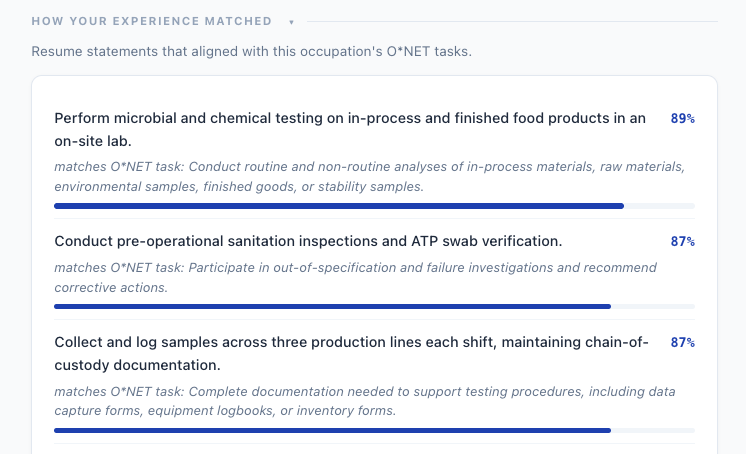
No personality quiz or self-assessment. The match comes from the work a student has actually done, compared against federal O*NET task statements — evidence, not aspiration.
Tells students where to aim first
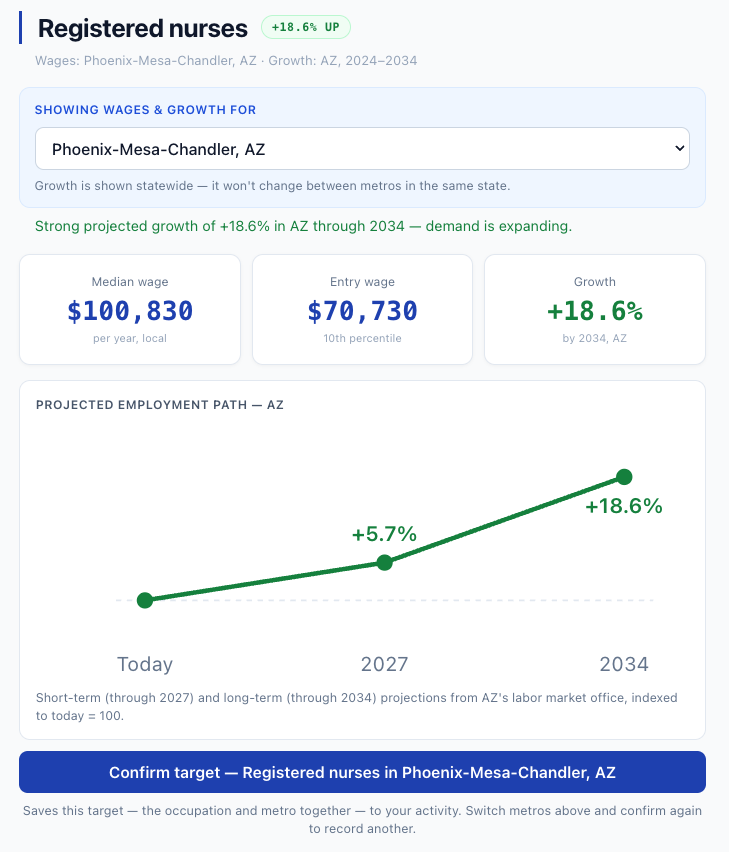
Instead of guessing a search term, students see the occupation their experience points to — and whether it's worth pursuing, with local wages and the state's projected trajectory through 2027 and 2034, before they ever apply.
Ties national data to each student
Labor-market dashboards sell aggregate regional data. Career Match grounds that same federal data in the individual — and builds your institution's aggregate from real student activity, not a purchased feed.
Interprets the resume, doesn't just format it
It reads what a resume is pointing toward and reflects it back — so students understand how their experience reads in the labor market.
What the student does.
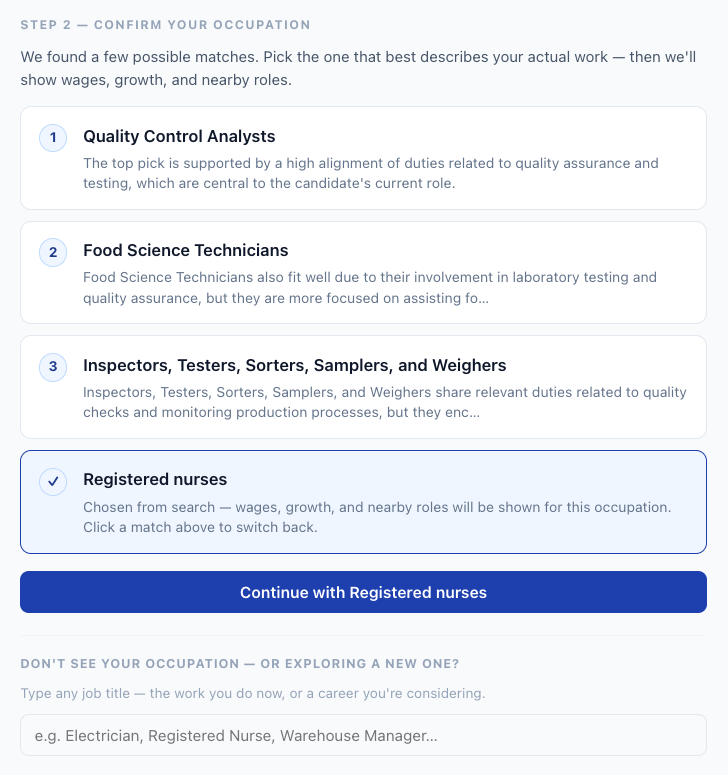
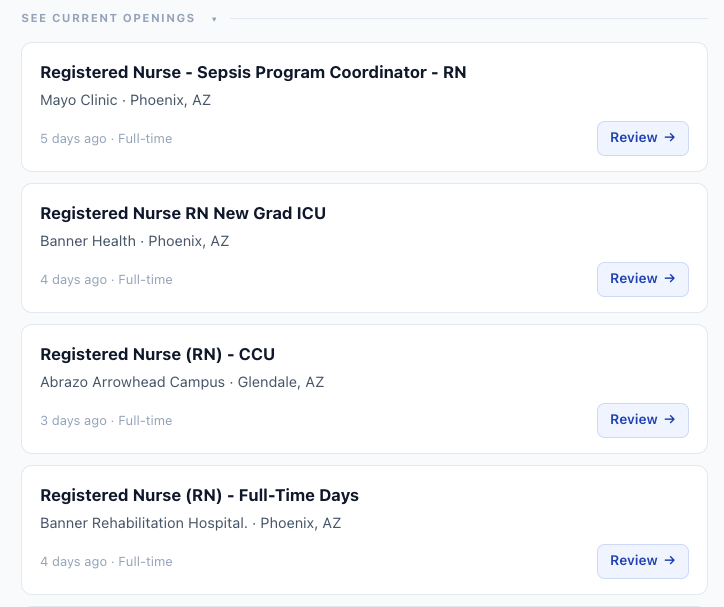
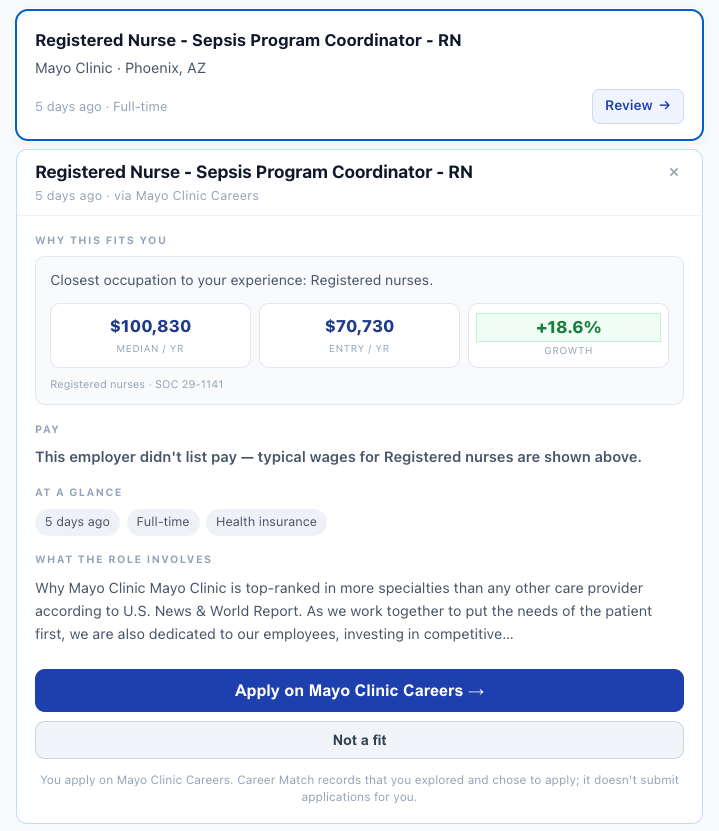
Students start from a resume they already have — no re-entry, no forms. The engine matches their duties against 18,796 O*NET task statements across 923 occupations, then layers in local wages, the occupation's projected employment path on two horizons — 2027 and 2034, from their state's own labor market office — transferable career paths, and live openings.
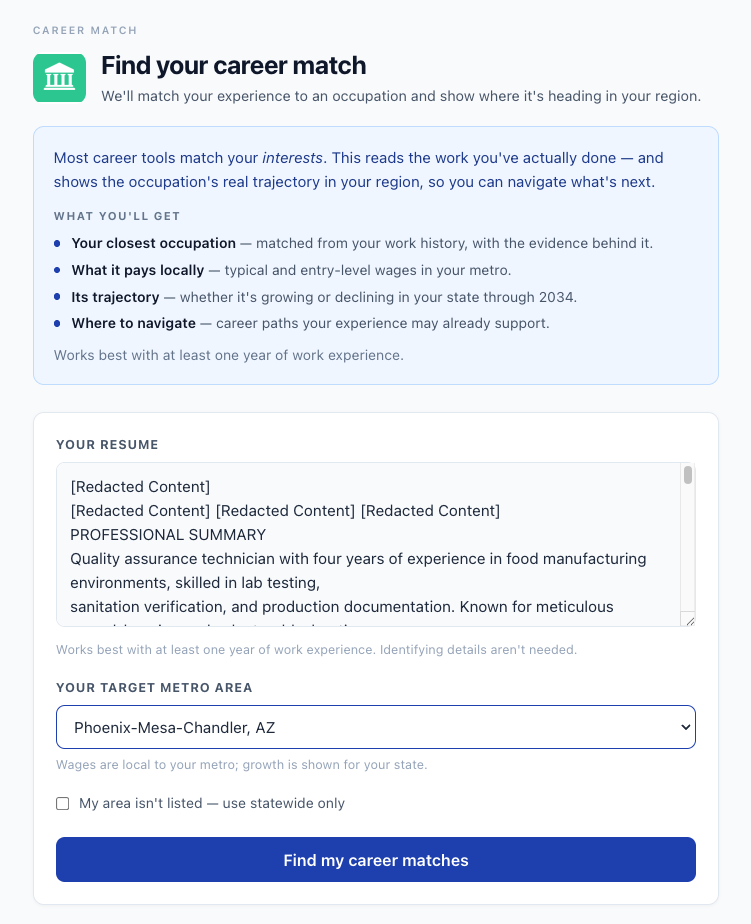
Built for the 180-day clock.
A Workforce Pell program runs eight to fifteen weeks, and its eligibility depends on placing 70% of completers within 180 days. There's no semester to run a traditional career office across — participants need to leave pointed at a job, and your team needs a record of the effort. Career Match is the readiness layer that fits that timeline, and it pairs with SkillsFirst resume building to turn a new credential into a job-ready resume before the program ends. It also carries the number the 70% gate quietly depends on: whether the occupation a participant is aiming at is growing in your state at all — states approve hundreds of programs as Pell-eligible, and eligible does not always mean wise.
Job-ready before they finish
Participants build a resume and confirm a target occupation during the program — so they exit aimed at local roles with real wages and growth, not holding a to-do list once the cohort disperses.
Built for adult career-changers
Most Pell participants arrive with real work history. Because the match reads demonstrated experience, it translates prior work plus the new credential into the occupation they trained for — not a blank-slate quiz.
Career services without a career office
Embedded and branded to you, self-serve for the participant. A short cohort gets a real career-navigation layer without standing up advising staff you don't have the runway to hire.
An activity record for your file
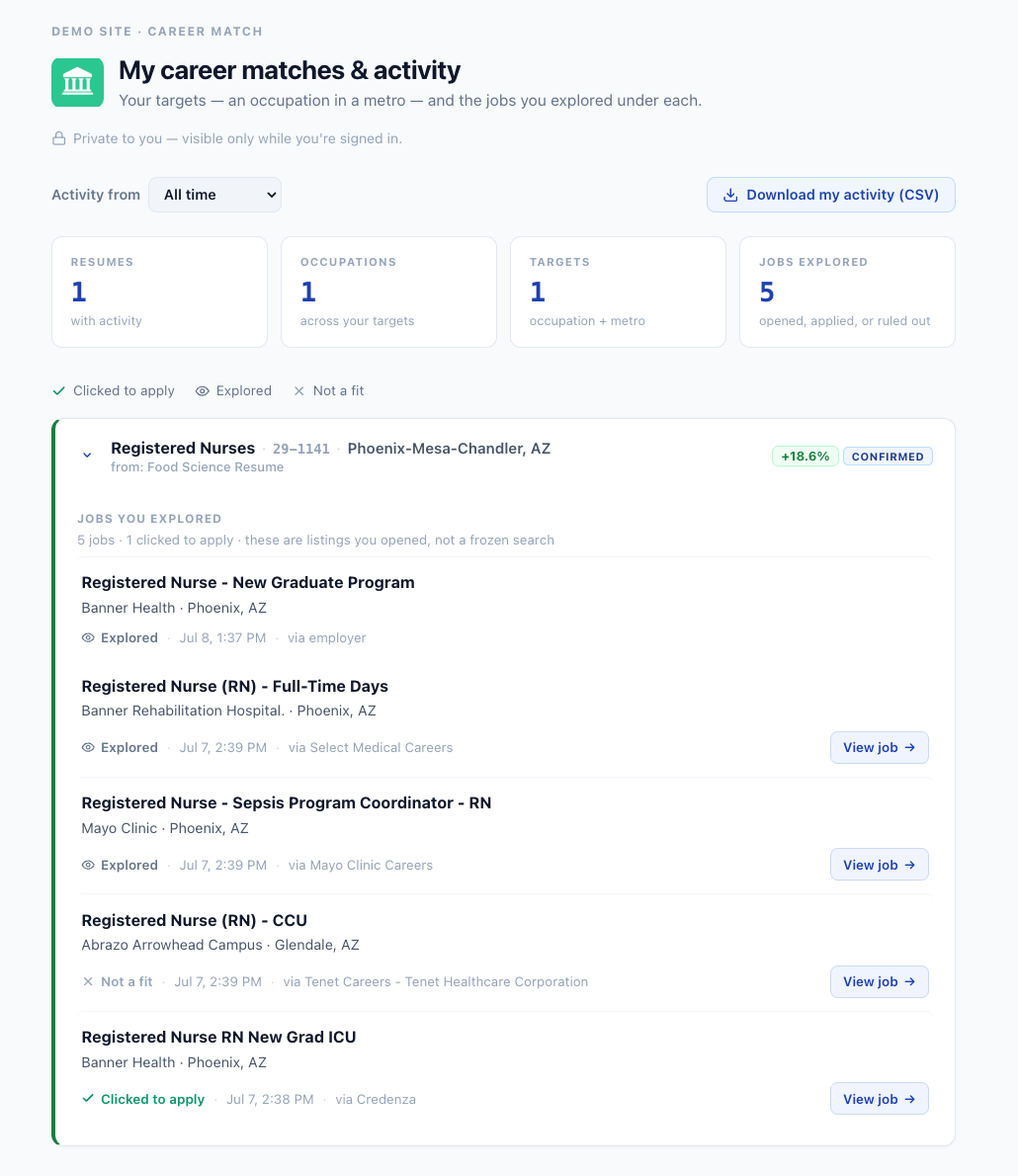
The per-participant view records, for each participant, the openings they explored, the ones they chose to apply to, and the ones they ruled out — with dates — for staff follow-up. It's the interim engagement trail you manage toward 70% with, while the official placement and wage figures come from your follow-up and the state's records.
What it is, and isn't. Career Match makes participants job-ready and gives your team a documented activity trail. It does not place participants or certify the 70% outcome — they apply on the employer's own site, and verified placement comes from your follow-up and the state's wage match. It's the readiness and documentation layer in front of the gate, not the gate itself.
One student action. Two kinds of value.
The same resume a student uses to find their own direction becomes, in aggregate, your read on where your population is heading. One loop — grounded in federal data — not two separate tools bolted together.
A resume
The work a student has actually done, from a resume they already have.
Career Match
Matches their duties against O*NET tasks, then layers in local wages and growth.
Grounded direction
Their occupation, local pay, trajectory, and live openings.
Workforce intelligence
Where your population is heading — in real time, in aggregate.
A live read on where your students are heading.
Every student action quietly feeds an institution view — no extra work for your team. Three layers, depending on what your program needs: an anonymized aggregate of confirmed direction, an optional per-participant activity view for workforce programs that document engagement, and the participant’s own private record of their path.
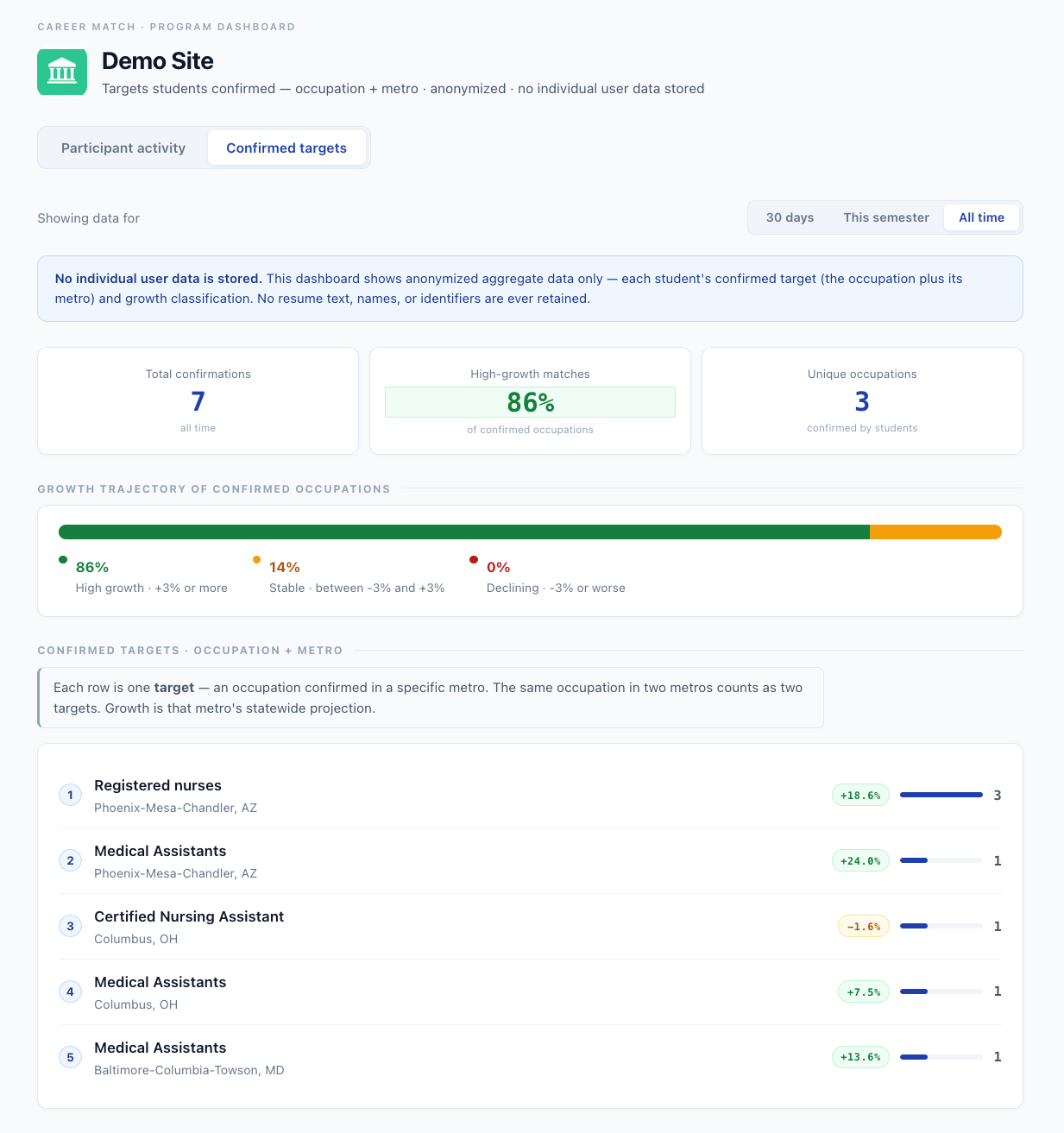
Confirmed matches — where the population is heading
As students confirm their target occupation, you see which fields they're heading into, how many are aiming at high-growth occupations, and which regions they want to work in — in real time, with no resume text, names, or identifiers stored. Growth is resolved live from your state's current projections on both horizons, so the dashboard updates itself the day your state files new numbers.
Participant activity — for staff follow-up & proof of participation
For programs that need to document engagement: for each participant, the openings they explored, the ones they chose to apply to, and the ones they ruled out as not a fit — each with a date — plus an apply-through rate across the cohort. Each participant row now answers the direction question too: a “pursuing” verdict showing the growth of the target they’ve actually been working — green, flat, or declining, with a flag when the 2027 and 2034 outlooks disagree — and a “targets growing” count across everything they’ve confirmed. Engagement statuses (active, quiet, inactive) surface who needs a check-in this week. It records that a participant went to apply on the employer's site; it does not track whether an application was actually submitted, which happens on the employer's own site and out of view. For a Pell program, that trail is the engagement evidence you keep while managing toward the 70% placement gate.
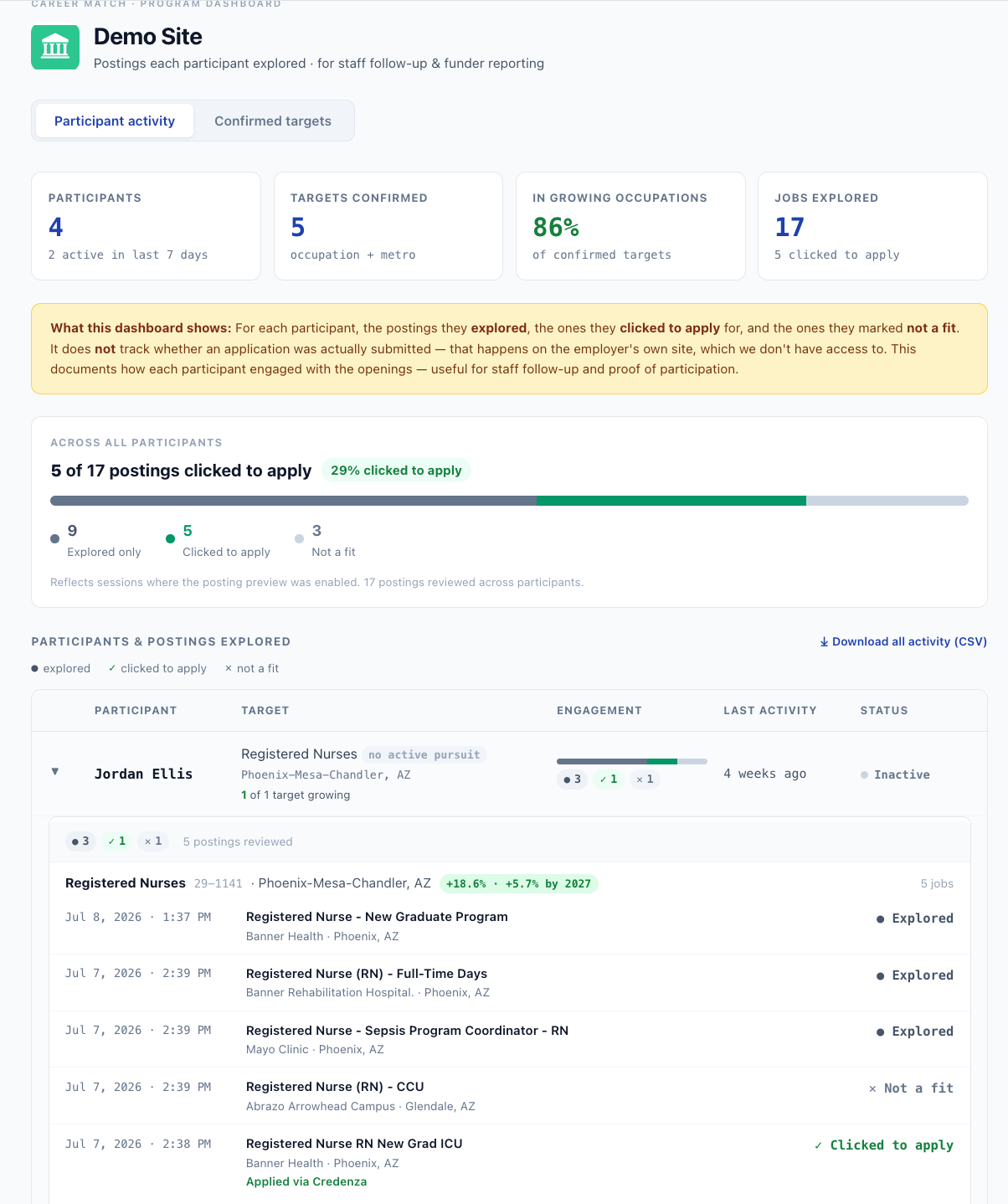
My activity — what each student sees of their own path
Participants get their own private view: the occupations they confirmed, in which metros, and the postings they explored, applied to, or ruled out — each with a date, and downloadable as their own record. It’s the same engagement trail staff see, from the student’s side — visible only to them while they’re signed in.
A leading indicator, not a lagging one. Most career data arrives years after graduation through surveys. Career Match surfaces which occupations students are actively targeting — confirmed from their own work history — before they leave your platform. Use it to inform advising, program design, and employer partnerships where your students are actually heading.
One line of code. Branded to you.
Career Match is designed to be embedded, not rebuilt. No API to wire up, no data pipeline to manage, no resume text stored on our end. You supply a domain and a brand — we supply the intelligence.
Tell us your brand
Send us your logo, name, and accent color. We configure a branded instance — no code changes on your side.
Get your embed URL
You receive a single URL scoped to your platform. Drop it into an iframe wherever career navigation should appear.
width="100%" height="900">
</iframe>
Your students start navigating
Students start from a resume, confirm their occupation, and immediately see wages, growth projections, career paths, and live job openings — all in your branded environment.
Resume text is never stored
It's processed in memory for the match and discarded — no resume text, names, or identifiers retained.
No complex data agreement
The only third-party processor is OpenAI for occupation matching — consistent with standard platform AI usage policies.
Federal data sources
BLS OEWS wages, state projections, O*NET 30.2 task standards — all labeled and dated in every result.
Participants control their data
Career Match never applies or shares on a participant's behalf. They go to the real posting and decide what to send, and to whom — no surprises.
Add career navigation to your platform.
We work with career services teams, student success platforms, and Workforce Pell and short-term programs. Let's talk about how Career Match could work for your students — and what your team would see.